So you think you can NIC?

Sometimes in life, you get even bigger servers, with MOAR NICs then you can count on one hand.
At rAge we had 12 of the bad boys.

Here, we will use 5 in a server with 5 x 1 GbE on the Mobo, and an add in card with another 4 NICs.

We will only use 5 for now, as we dont wanna kill that switch so early in its lifetime!

This is what we are working with:

root@gamecache:/# networkctl
IDX LINK TYPE OPERATIONAL SETUP
1 lo loopback n/a n/a
2 ens7f0 ether n/a n/a
3 ens7f1 ether n/a n/a
4 ens4f0 ether n/a n/a
5 ens4f1 ether n/a n/a
6 ens5f0 ether n/a n/a
7 ens5f1 ether n/a n/a
8 enp12s0f0 ether n/a n/a
9 enp12s0f1 ether n/a n/a
10 enp16s0 ether n/a n/a

10 links listed.

That is 9 NICs, all 1GbE. So lets team up!

Here is what we would use in our interfaces file:

# The loopback network interface
auto lo
iface lo inet loopback

#Bond1
auto bond0
iface bond0 inet static
address 192.168.1.33
netmask 255.255.255.0
bond-slaves none
bond-mode 4
bond-miimon 100

#we will use port 1,2,3,4,A21 as we know they work

#Port 1
auto ens7f0
iface ens7f0 inet manual
bond-master bond0
bond-primary ens7f0 ens7f1 ens4f0 ens4f1 ens5f1

#Port 2
auto ens7f1
iface ens7f1 inet manual
bond-master bond0
bond-primary ens7f0 ens7f1 ens4f0 ens4f1 ens5f1
#Port 3
auto ens4f0
iface ens4f0 inet manual
bond-master bond0
bond-primary ens7f0 ens7f1 ens4f0 ens4f1 ens5f1

#Port 4
auto ens4f1
iface ens4f1 inet manual
bond-master bond0
bond-primary ens7f0 ens7f1 ens4f0 ens4f1 ens5f1

#Port 5
auto enp16s0
iface enp16s0 inet dhcp

#Add on 2 Port 1
auto ens5f1
iface ens5f1 inet manual
bond-master bond0
bond-primary ens7f0 ens7f1 ens4f0 ens4f1 ens5f1

#Add on 2 Port 2
#auto ens5f0
#iface ens5f0 inet dhcp
Quite a few NICs, and now we have 5Gbps at hand, with a total of 9 if we need in future.

Off to the DC we go!

The bigger scope of things.

Sometimes, we can use allll of the IPs, we don’t get the luxury of having an infinite amount available, and we need to make do with ONE IP.

Well, NGINX doesnt stress about that, we just need to set it up. Nginx will take a look at the Host Headers, and use those to determine what server the user is looking for.

So here is more-or-less how it works:

===
server {
listen www.domain1.com:80;
access_log /var/log/nginx/host.domain1.access.log main;
root /var/www/domain1;
server_name www.domain1.com;
xxx
}
}

server {
listen www.domain2.com:80;
access_log /var/log/nginx/host.domain2.access.log main;
root /var/www/domain2;
server_name www.domain2.com;
xxx
}
===

Now the important thing is the server_name.

Here, you put the redirected DNS hosts, and bob is your uncle… It works with the StreamCache setup perfectly.

rAge 2015 – The stats

So, stats from the SteamCache at rAge 2015

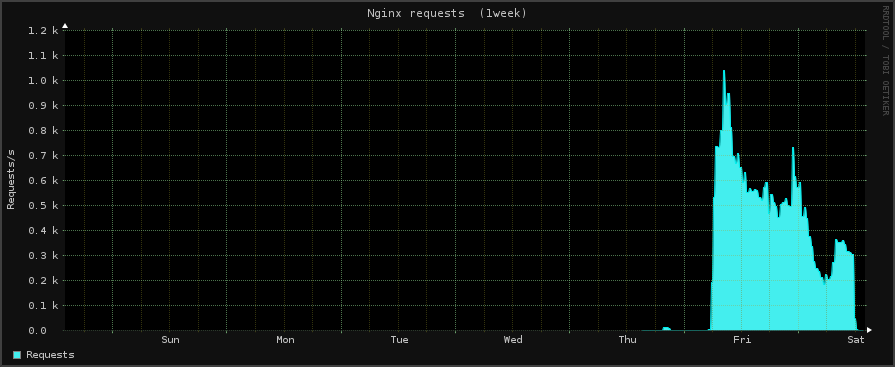
16.4TB was recieced through the internet IP, and 51.1TB was sent out by the cache’s Steam IP.
The highest peak of traffic to the cache from the LAN bond, was 10.07Gbps, on Friday morning.
The max tracked connections to the cache was 1400 connections per second.
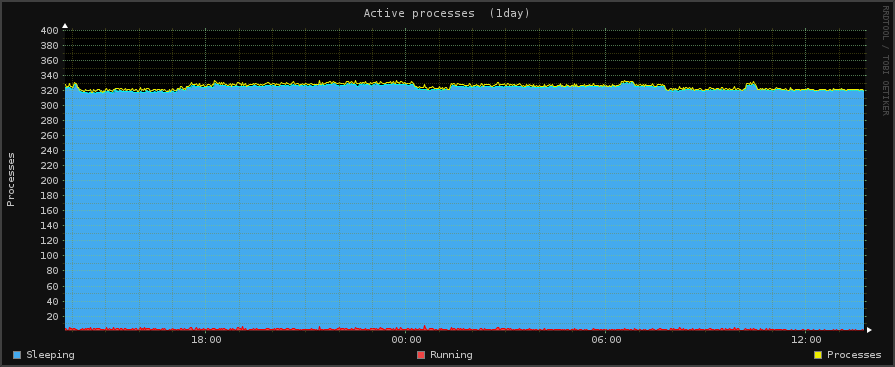
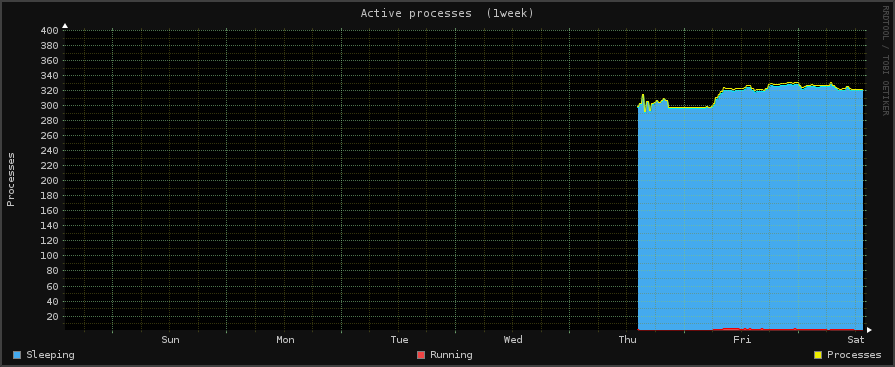
The max System Load on the box was around 15
We hit 5000 Read/Writes per second as a max.


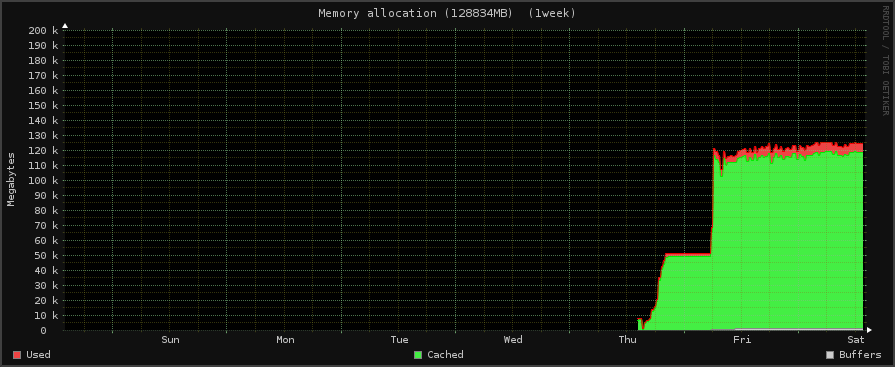
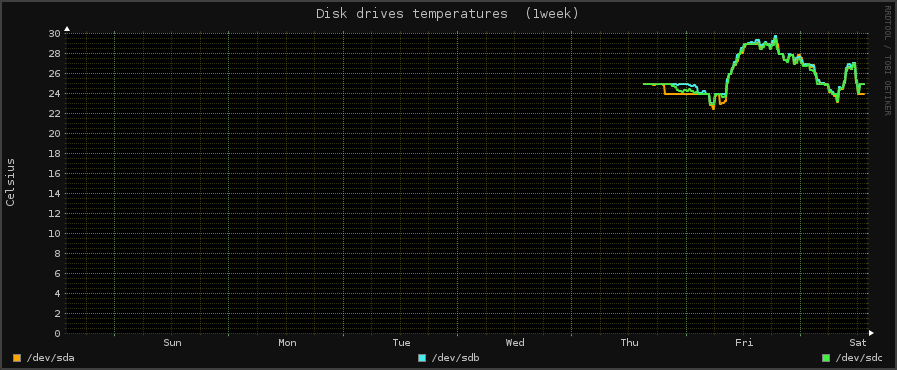
system1z.1day system3z.1day system2z.1day lmsens1z.1day disk01z.1day fs02z.1day fs01z.1day net01z.1day net02z.1day net11z.1day net12z.1day netstat1z.1day netstat3z.1day netstat4z.1day port0iz.1day nginx1z.1day nginx2z.1day nginx3z.1day system1z.1week system2z.1week system3z.1week lmsens1z.1week disk01z.1week fs01z.1week fs02z.1week fs03z.1week net01z.1week net02z.1week net11z.1week net12z.1week netstat1z.1week netstat3z.1week netstat4z.1week netstat5z.1week port0iz.1week port1iz.1week nginx1z.1week nginx2z.1week nginx3z.1week

rAge 2015 Post 4

So, it is in motion!
The event is slowly being built up, and its quite impressive to see.

From the LAN side, we have put out the 12KM odd of LAN cable, and the associated power cables. Nothing is live quite yet, and we await the networking equipment, but this will come in time! The servers were setup and are now running, what beasts.
One issue I ran into was the Hardware VS Software RAID.. There was a RAID done on the server as is with its RAID Controller, then Ubuntu was trying to RAID itself with its Software raid. Which really confused me. But after stumbling around I found this out, removed the Ubuntu RAID, removed the Hardware RAID, and boom, we were able to raid ALL the drives for 1TB of SSD goodness.
I am still not sure if we should have left one drive out of the RAID for its boot drive, but eh. Time will tell.

For now, all 8 of the 120GB SSDs are in RAID 0 for around 1TB of space, I didn’t really want -1 drive for the OS, as we were a little low on space as is.
We have 128GB of RAM in this BEAST, and she will be our main Steam box.

I ran into the first issue quite quickly, I wasn’t able to get onto the net as we haven’t set ours up yet, and the Wifi inside the event wasn’t gonna work for a server that REALLY doesn’t have WiFi capabilities.

But thanks to this link: http://askubuntu.com/questions/359856/share-wireless-internet-connection-through-ethernet
we should be able to connect the server to my lappy, and share its connection from the WiFi or from my 3G hotspot to it. Boom. Then we can get the files and perhaps updates we need onto the server.

Then we are estimating that the internet from IS will get there on Thursday.

And here I leave you with some bad images of some of the setup

:20151005135104 20151005135059 (2) 20151005135059 (1)

rAge 2015 Post 3

Today we add nginx to out Monitorix, and install BandwidthD for extra bandwidth monitoring. I would like to see who our biggest bandwidth movers are. I use bandwidthd on a few PFSense boxes I run, and I love the way it works 🙂

Nginx seems to have its own monitoring running on localhost:
w3m localhost
Active connection: 1
server accepts handled requests
2147 2147 17038
Reading: 0 Writing: 1 Waiting: 0

Monitorix seems to know about this, and so we just need to tell it to go looking.
Edit /etc/monitorix/monitorix.conf:
Find this line: nginx = n
Make it:  nginx = y
Change any other things you would like in this file, then just save it.

Now, you should see the graph in Monitorix 🙂

Now we wanna install BandwidthD, and link it into Monitorix (Sorta)
Run:
apt-get install bandwidthd

And complete the installation.

Then we wanna add it to the same webservice as monitorix. We run:
ln -s /var/lib/bandwidthd/htdocs/ /var/lib/monitorix/www/bandwidth

Now we just open: http://192.168.1.12:8080/monitorix/bandwidth/index.html
Now we have more pretty graphs! 🙂

The data may not save on a reboot though, so that is something we have to look into…

rAge 2015 Post 2

So today we will take a look at setting up Monitorix on our Ubuntu box.

We will use this to see pretty graphs of our server, and find out what it is doing, and how it is coping with the loads put on it.

First, we have to add the respository
Add this line at the end off /etc/apt/sources.list
deb http://apt.izzysoft.de/ubuntu generic universe

Then be sure to apt-get update
Then go ahead and install the pacakage:
apt-get install monitorix

By default it runs on port 8080 🙂

[Images taken from http://www.monitorix.org]

rAge LAN 2015 Post 1

So I am a part of building the NAG LAN at the biggest Gaming Expo in South Africa.
rAge

My main purpose at the event will be to set-up the the LAN cache, as done here by Multiplay.

I have 2 x the below to work with:
2 x Intel Xeon CPU E5-2690 v2 @ 3.00 GHz, 10 Cores, 20 Logical Processors
1 x SSD 160GB
5 x SSD 120GB
64 GB RAM
8 x 1GB Eth

These are some pretty BEASTY servers.

Lets just crunch some numbers quick:
There are 10 + 10 physical cores – Which gives us 20 physical cores.
There are 20 + 20 virtual cores – Which gives us 40 virtual cores. Madness?

Then if we were to put all 10 x 120GB SSDs in RAID 0 in one server…
Lets assume that the SSDs have a read/write of around 500MB/s these days.
That is 5GB/s of space. Pure space.

And we have 8GBps of Network traffic, so even in a setup like this, the storage is still a bottleneck.
We have a 5.2GBps internet connection coming into the event, so this would be the “backhaul” for us to connect to Steam servers and get stuff for the cache.
But why would we even want a SteamCache with a connection like that?!
Well, we would like to make sure as much of that pipe is left open for games, other downloads, torrents, whatever. If we can take some duplication off of that connection and keep things outside the LAN as quick as we can, that would be a win.

So if we were to put all the 120GB SSDs into one server, we would only have 1.2TB of space. This really concerned me at first, but then I was made aware that nginx has something to deal with this:
“The special “cache manager” process monitors the maximum cache size set by the max_size parameter. When this size is exceeded, it removes the least recently used data.”
==
if all-cache.size > max-size:
del *the most inactive cache* until size < max-size
==

What a relief! Now that guys Sims 2 game can be purged from the cache once he and his friends have downloaded it.

The OS we will use at the event is Ubuntu. I find it easier to work with, and I am more comfortable using it. If something were to go wrong, I wouldn’t need to sit there with a FreeBSD for Dummies.

I will keep the blog up to date as I go on 🙂